How to Add a Watermark to a PDF for Free
A watermark takes thirty seconds to add — and saves you from the "wait, did they just forward my draft to a competitor?" nightmare.
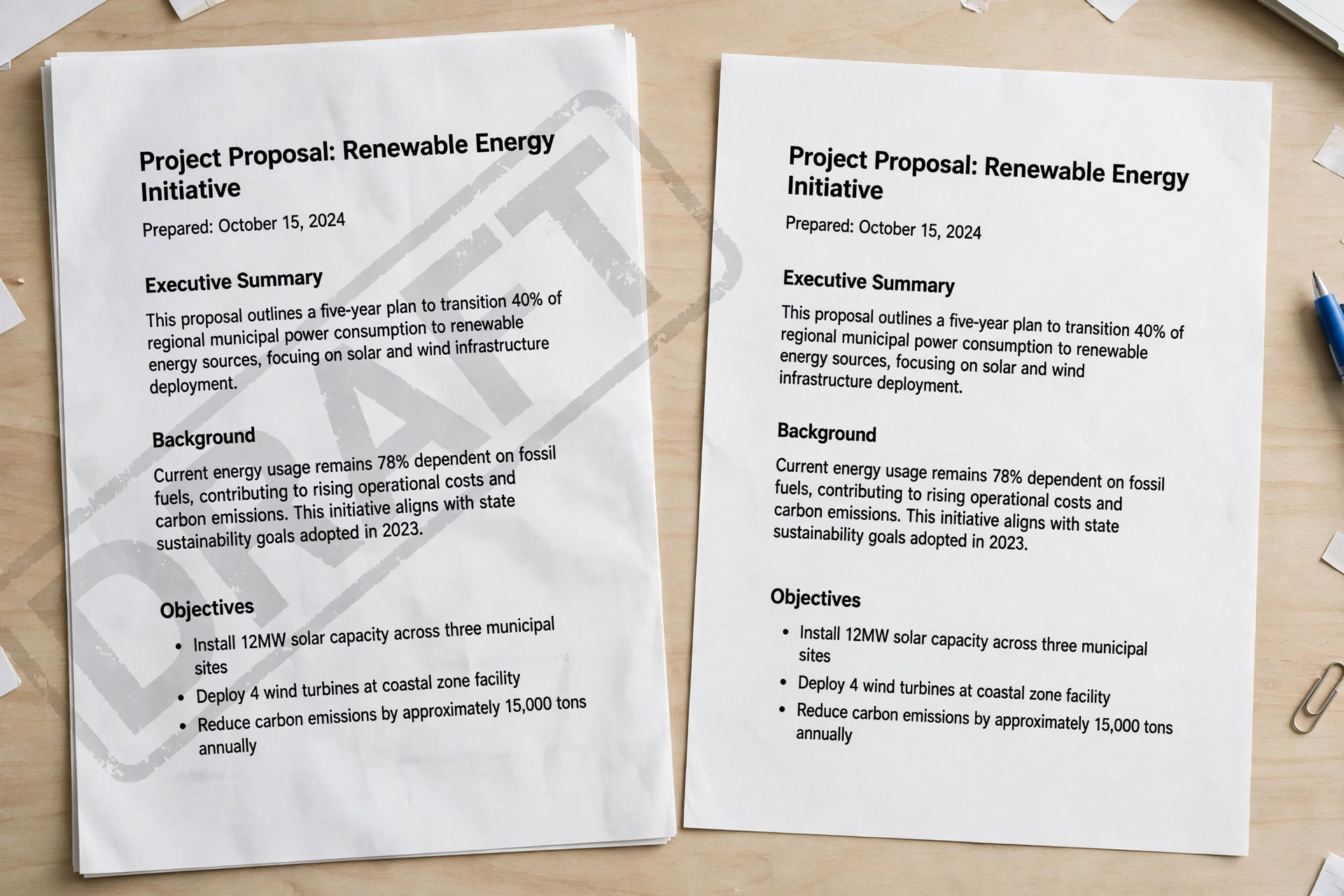
You're about to email a project quote to a client. It's a draft — prices might change — but the PDF looks final. That's what watermarks are for: a semi-transparent DRAFT, CONFIDENTIAL, or company-logo stamp across every page — impossible to miss, hard to ignore.
Most tutorials say "upload to a free tool, adjust, download" and stop there. Let's do better: exact settings, a real tool walkthrough, and the honest limitations nobody mentions.
What Is a PDF Watermark, Exactly?
A watermark is text or an image stamped across PDF pages at low opacity — visible enough to notice, faint enough to read through. The classics: DRAFT on work in progress, CONFIDENTIAL on sensitive docs, SAMPLE on portfolio pieces, a logo on client-facing files. Two kinds: text watermarks (a word in a font you choose) and image watermarks (a logo or graphic, usually a PNG with transparency so the background stays clean).
How Do I Add a Watermark to a PDF for Free?
The fastest route is a free browser tool. I'll walk through Pixoate's free watermark tool — its controls match what the good ones offer (PDF24, Sejda, Smallpdf, iLovePDF all work the same way):
- Upload your PDF — drag and drop it onto the page.
- Pick a preset or type your own text. Presets include CONFIDENTIAL, DRAFT, COPY, APPROVED, FINAL, SAMPLE, PAID, and DO NOT COPY — or type anything ("INTERNAL ONLY" works fine).
- Set the position. DIAGONAL gives the classic stamp-across-the-page look; a corner keeps it subtle.
- Dial in the look: opacity 20–25%, font size 60–80 pt on letter/A4 pages, gray or light-red color, 45° rotation.
- Apply and download. The stamp becomes part of each page — it shows in every PDF viewer and prints as previewed.
Under a minute, genuinely. No account, no payment, no watermark-on-your-watermark nonsense.
Text or Image Watermark — Which Should I Use?
| Text watermark | Image watermark | |
|---|---|---|
| Best for | DRAFT, CONFIDENTIAL, date stamps, page labels | Company logos, signatures, branded documents |
| File size impact | Almost none — just a few characters of data | Slight increase, more if the image is high-res |
| Sharpness | Always crisp at any zoom | Depends on the source image resolution |
| Setup | Type and go | Needs a clean PNG with transparency |
My rule: text for status labels (DRAFT, CONFIDENTIAL), image for branding. Watermarking client deliverables with your logo? Make a proper transparent PNG — a white-boxed JPG looks amateurish.
What Are the Best Free Watermark Tools?
| Tool | Signup needed | Text / image | Page ranges |
|---|---|---|---|
| Pixoate | No | Text | All pages |
| PDF24 Tools | No | Text + image | Custom ranges |
| Sejda | No | Text + image | Custom ranges |
| Smallpdf | Sometimes* | Text + image | Custom ranges |
| iLovePDF | Sometimes* | Text + image | Custom ranges |
| LibreOffice Draw | N/A (desktop app) | Text + image | Manual per page |
*Free tiers rotate. For a one-off job I'd start with PDF24 or Sejda: no account, no fuss.
Desktop route: Adobe Acrobat Pro gives the most control — "appear behind page" vs "on top of page" layering, all/odd/even/custom page ranges, and batch watermarking. This Acrobat watermark tutorial (PDF) covers every dialog option. Worth it if you watermark weekly; overkill for a one-off.
3 Settings That Make a Watermark Look Professional
Opacity is the setting most people get wrong:
- Opacity 20–25%. Readable on screen, visible on paper, never obscures content.
- Behind the page content. The stamp sits under the text like a real rubber stamp — cleaner than text floating over paragraphs.
- 45° diagonal, centered. Visible on every page regardless of layout, and it looks official in a way a corner label doesn't.
The Honest Limitations
Two things the other tutorials won't tell you. First, a watermark does not truly prevent copying — anyone with a decent PDF editor can remove it. It's a deterrent and a label, not a lock. Second, it isn't legal protection on its own: it shows ownership and can support your case in a dispute, but it doesn't create copyright. And a privacy note: for contracts or medical records, prefer a desktop app like LibreOffice Draw over random upload sites.
If the watermarked file ends up too heavy — image watermarks add weight — run it through our Compress PDF tool afterwards. And if only some pages need the stamp, split out those pages, watermark them, and merge everything back. More on keeping files lean in our PDF file-size guide.
Frequently asked questions
Can I watermark only some pages of a PDF?
Yes. Good watermark tools let you apply the stamp to a custom page range, or odd/even pages only. Adobe Acrobat's watermark dialog offers all pages, odd, even, or a specific range.
Can I add a watermark to a scanned PDF?
Yes. Scanned PDFs are treated like regular PDFs — the stamp goes over the scanned image pages exactly the same way, for both text and image watermarks.
Does a watermark increase PDF file size?
A text watermark adds almost nothing — just a few characters of data. An image watermark can add a little, especially a high-resolution one. Compress afterwards with our Compress PDF tool if needed.
Is a watermark copyright protection?
Not on its own. It shows ownership and discourages casual copying, but it isn't legally binding copyright — though it can serve as supporting evidence in a dispute.
Keep reading: how to reduce PDF file size, and how to split PDF pages.